



Showpad | May 2026 |AI-powered content generation for page blocks (text and image)
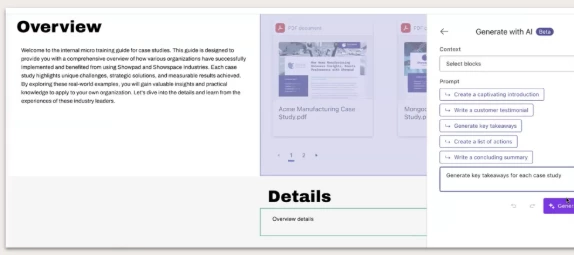
What it is
Instantly generate text, images, or even complete pages directly within the Showpad Page builder. This AI-powered tool acts as your creative partner, using a single prompt or your existing content as context to automatically draft compelling copy and create on-brand images. Effortlessly populate Text, Heading, and Gallery blocks to go from concept to a published Page in minutes.
Who it's for
Marketing and Enablement Admins who want to publish more high-quality Pages faster and need to reduce the manual effort of populating blocks with highly-engaging and accurate content.
Why it matters
-
Increase content velocity: Publish more high-quality Pages faster for your diverse audiences. By eliminating the tedious and time-consuming manual effort of drafting text from a blank canvas, you empower your entire revenue organization to move at an unprecedented pace.
-
Enhance messaging quality: Ensure your product messaging is consistently compelling and tailored across all buyer interactions. The AI leverages your existing page content as context, acting as a collaborative partner to maintain a unified and engaging brand voice.
- Consolidate your workflow: Create unique, on-brand images for Gallery blocks directly within Showpad, eliminating the need to switch back and forth between tools.
Key use cases
-
Launch products faster: You need to roll out a complex new medical device to the field, but manually crafting tailored pages for different buyer personas is a monumental challenge. You enter a single prompt, and the AI instantly generates a complete page that is personalized to the buying criteria of a specific persona.
-
Refine messaging instantly: A major manufacturing deal requires highly specific technical framing, but you are staring at a blank text block. You hover over the block, click the "Generate with AI" button, and use a pre-defined prompt to have the AI instantly write a captivating introduction based on the surrounding section.
- Visualize without designers: Your consumer goods sales team needs highly visual content, but your design team is backlogged. You simply select a Gallery block, enter a text prompt describing the image you want, choose a "Photorealism" style, and the AI generates multiple high-quality image variations for you to insert immediately.
Access & availability
This is an open beta feature. It must be toggled on via AI Admin settings.
- Legacy packaging: All packages
- eOS packaging: All packages